Gesture Answer Call1.8.1
Publisher Description
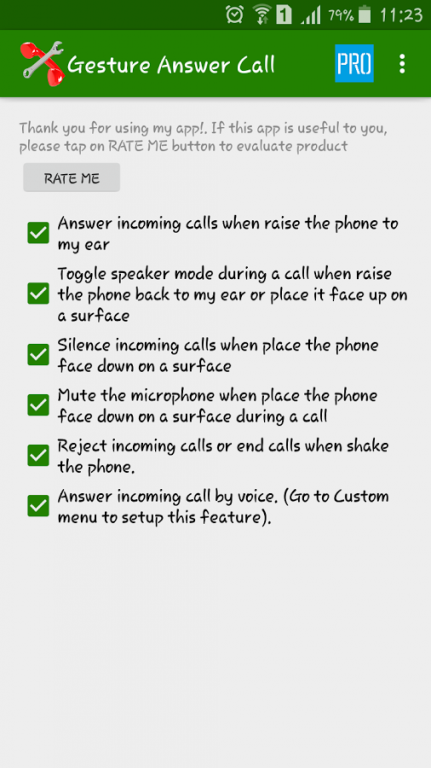
Gesture Answer Call changes the way you interact with your phone on call. All actions: Answer, turn on speaker… let your smart phone do it. App works fine with android 4.x up to 6.x
Features:
- Answer incoming calls when raise the phone to my ear (this feature works best when placed phone in vertical state)
- Toggle speaker mode during a call when raise the phone back to my ear or place it face up on a surface.
- Silence incoming calls when place the phone face down on a surface.
- Mute the microphone when place the phone face down on a surface during a call.
- Shake to reject incoming calls or end calls.
- Answer incoming by voice command.
Of course, this smart app know your phone is in the pocket, or use cover.
NOTICE: If your phone used Android 5.x or higher, you need to allow this app access Notification. With Android 6.x, you need to allow all permissions: Go to Setting, Application manager, Gesture Answer Call, Permission and turn on all on this.
Install and enjoy!
About Gesture Answer Call
The company that develops Gesture Answer Call is XLSoft. The latest version released by its developer is 1.8.1.
To install Gesture Answer Call on your Android device, just click the green Continue To App button above to start the installation process. The app is listed on our website since 2016-09-06 and was downloaded 707 times. We have already checked if the download link is safe, however for your own protection we recommend that you scan the downloaded app with your antivirus. Your antivirus may detect the Gesture Answer Call as malware as malware if the download link to com.xlsoft.longdaica.gestureanswercall is broken.
How to install Gesture Answer Call on your Android device:
- Click on the Continue To App button on our website. This will redirect you to Google Play.
- Once the Gesture Answer Call is shown in the Google Play listing of your Android device, you can start its download and installation. Tap on the Install button located below the search bar and to the right of the app icon.
- A pop-up window with the permissions required by Gesture Answer Call will be shown. Click on Accept to continue the process.
- Gesture Answer Call will be downloaded onto your device, displaying a progress. Once the download completes, the installation will start and you'll get a notification after the installation is finished.
Program Details
System requirements
Download information
Pricing
Version History
version 1.8.1
posted on 2016-09-06
- Support Russian.,- Fix audio bug.
